
inGuide | Digital Marketing, Online Business & WordPress
  • Home
  • Blog
  • Deals
  • Services
  • Forum
    • New Forum
  • Free Resources
    • inSend: Mailwizz
  • Contact
  • Click to open the search input field Click to open the search input field Search
  • Menu Menu
Miscellaneous

Build Self Hosted Private Chat Server with Open Source rocket.chat

build-private-self-hosted-chat-server-rocket-chat

The need to build a self-hosted private chat server arises due to many reasons. For instance, a company or organization wants to prevent company secrets from falling in the wrong hands, new software development or to ensure privacy, etc. Basically, information from popular chat services like WhatsApp, Messenger, Skype, Telegram, ICQ can easily be taken out or leaked by employees. Therefore, it’s of utmost need for companies to have control over information shared between employees over chat platforms. Luckily we have a few open-source solutions like rocket.chat, Let’s chat, etc.

About Rocket Chat system

What is Rocket chat?

Rocket Chat is a free, unlimited software that can replace chat solutions like Slack, Skype, etc. It provides a full range of basic features of a chat system such as:

  • Support LDAP / AD authentication
  • Support SSO
  • Chat
  • Chat Group
  • Audio Call
  • Video Call
  • …

Requirement

You will need

  • a domain
  • a VPS or cloud as per your requirement. Following section can help you in making a selection.

Deployment costs

Rocket Chat currently offers 3 rates as follows:

  • Community: free
  • Pro: $3/user monthly or $30/user annualy
  • Enterprise: tiered pricing and volume discount

For companies with about 5,000 employees, you can use the Community version without any problems. I even read the support of a company that has 150,000 employees and also uses the Community version.

Operating system

Rocket Chat supports installation on almost all types of Linux operating systems such as Debian, RedHat, Ubuntu, CentOS, …

And especially, Rocket Chat supports you to install on Amazon Docker and cloud AWS.

For the demonstration, I am using Ubuntu 20.04 on Digitalocean. But your choice is not limited to Ubuntu as already mentioned above.

Support client operating system

Rocket Chat works fully on all user terminals included.

  • Website
  • Desktop application: Mac, Windows, Linux
  • Mobile: Android and iOS

Determine the size of your organization

You need to determine how many users your company has? 50, 100, 500, 1000, 2000 or 5000 users. That is very important.

And you need to determine how many users are online at the same time.

The two things above will determine how much resources you need for the Rocket Chat system.

Recommended size from Rocket Chat

Below is the recommended size from Rocket Chat. However, it is limited to 1000 users. So, if your organization is more than 1000 users, you need to take a closer look and test.

For 200 users, 50 concurrents active.

  • Single core (2 GHz)
  • 1 GB RAM
  • 30 GB SSD

For 500 users, 100 concurrents active.

  • Dual core (2 GHz)
  • 2 GB RAM
  • 40 GB SSD

For 1000 users, 300 concurrents active.

  • Intel Xeon E5-2603 v4 (or equivalent) (1.7 GHz, 6 cores)
  • 4 GB RAM
  • 500 GB HDD or more

Sizing Rocket Chat system for 6000 users

For example, the company has 6000 users and about 4000 concurrents active.

Here is a my calculation of possible resources so that Rocket Chat system works well.

  • 3 server database with resource per each:
    • 8 cores Intel(R) Xeon(R) CPU E5-2698 v4 @ 2.20GHz
    • 8 GB RAM
    • 1.5 TB HDD (7k2 or 10k rpm). Usage rate of 0.004 GB/user/month. Ability to save data for 4 years.
  • 3 server app with resource per each:
    • 16 cores Intel(R) Xeon(R) CPU E5-2698 v4 @ 2.20GHz
    • 16 GB RAM
    • 15 TB HDD (7k2 or 10k rpm). Usage rate of 0.05 GB/user/month. Ability to save data for 4 years. Mount via shared storage, such as NFS.
  • 2 server nginx proxy with resource per each:
    • 4 cores Intel(R) Xeon(R) CPU E5-2698 v4 @ 2.20GHz
    • 4 GB RAM
    • 150 GB HDD (7k2 or 10k rpm).

Does Rocket Chat limits 1000 users?

I see that many people ask this question. Does Rocket Chat community only use for up to 1000 users?

I also searched and this is the answer. That’s the affirmation from Rocket Chat team. You can see that there is no user limit, it all depends on your server configuration.

Installation

Before you proceed with installation, create A record for your domain pointing to your server IP. Next connect to remote server using any SSH client like putty, Bitvise etc.

You will get warning message if you connect to the server for first time. Answer yes and begin executing commands as follows.

First of all update and upgrade the Server OS.

sudo apt update -y
sudo apt upgrade -y

Next set the hostname

sudo hostnamectl set-hostname app.inlearn.in

After this step execute the following command to install Rocket.chat

sudo snap install rocketchat-server

snap-install-rocket-chat

This installation will take few minutes. After that go to https://ipaddress:3000 or https://yourdomain.com:3000

Then you will be asked few questions as follows.
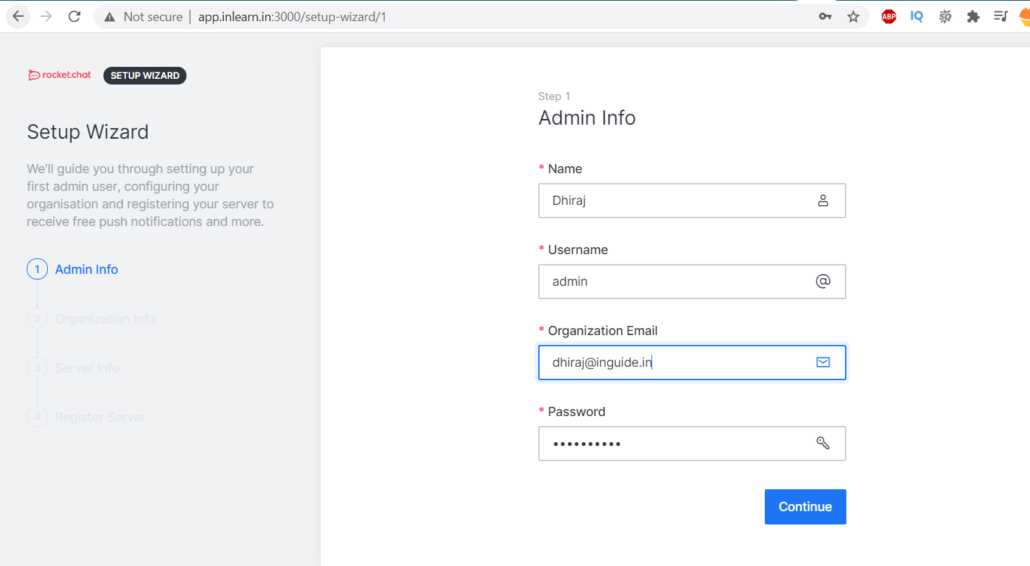
rocket-setup-wizard

Next, fill the organization info as shown on the screen.
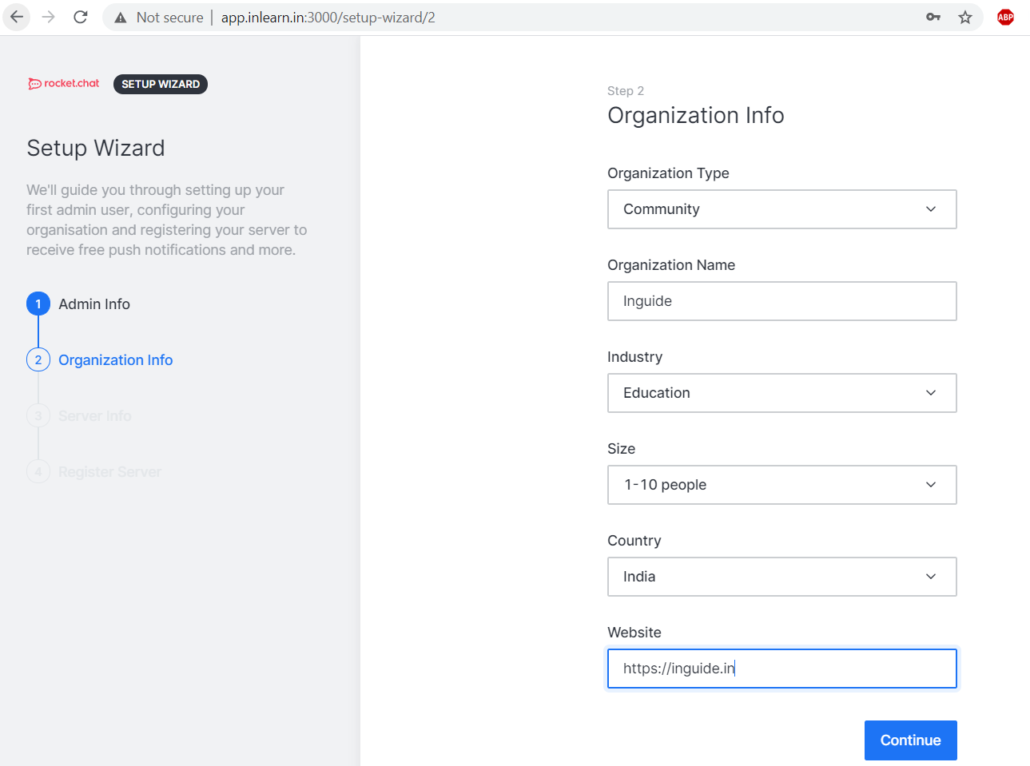
organization-info-rocket-install

After that you need to fill server info
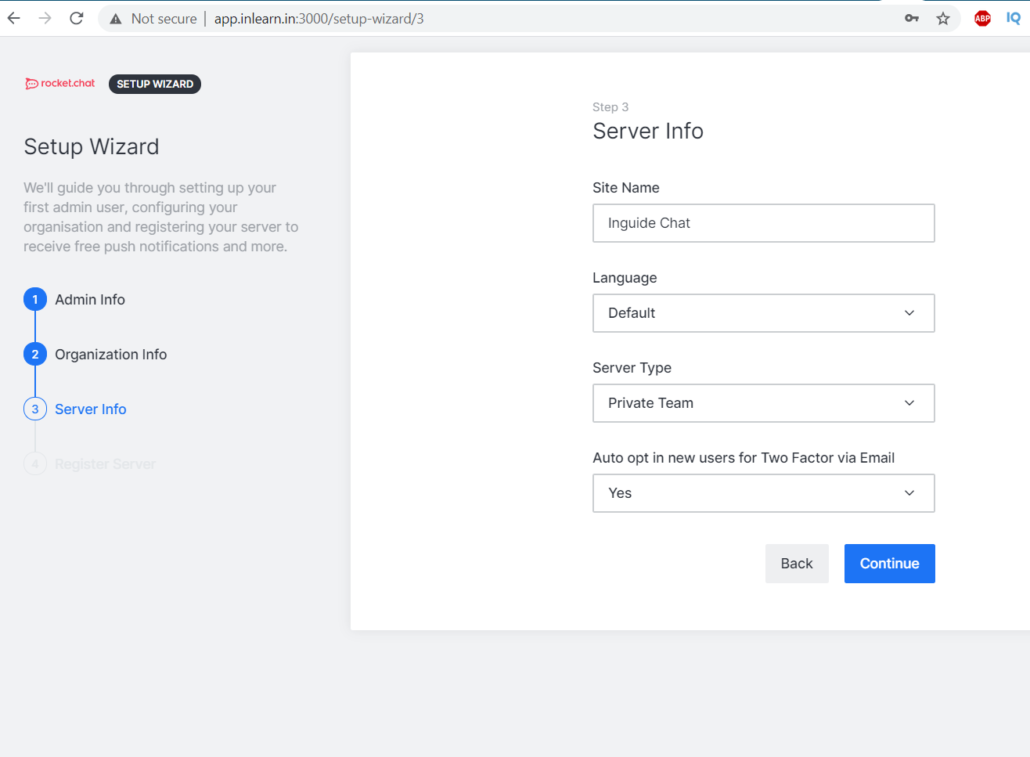
setup-wizard-rocket

On next screen you will be presented with 2 options to register server.
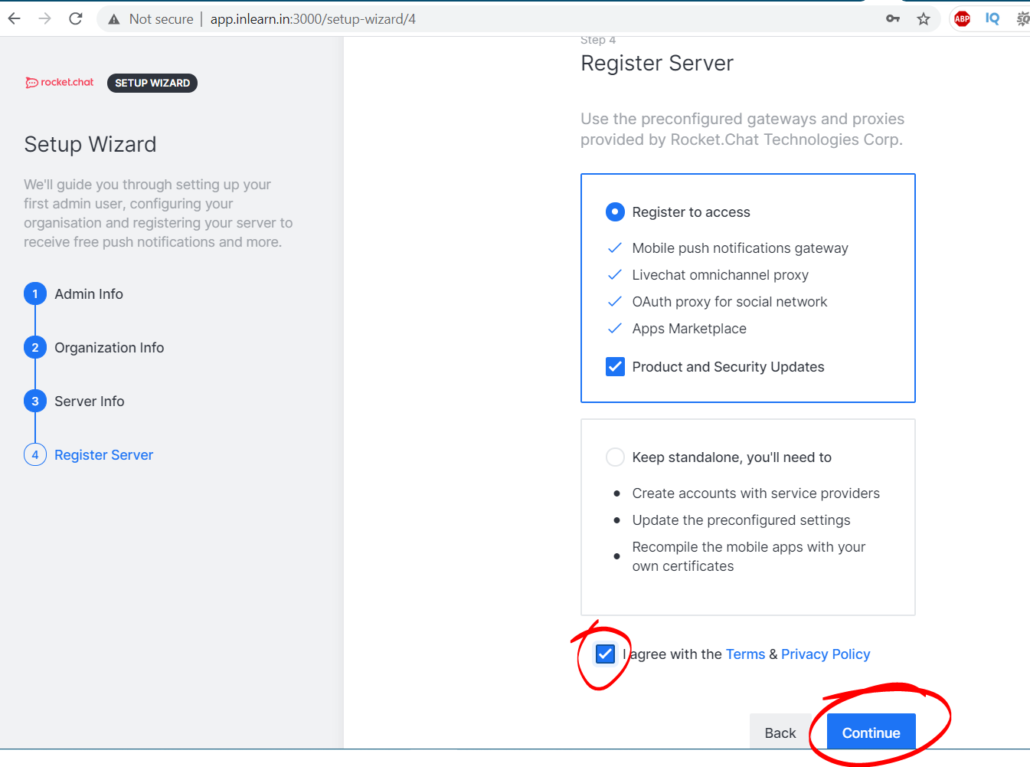
server-info-for-rocket-chat

After above step, you server is finally ready. Go to Workspace and create users, teams, channels.
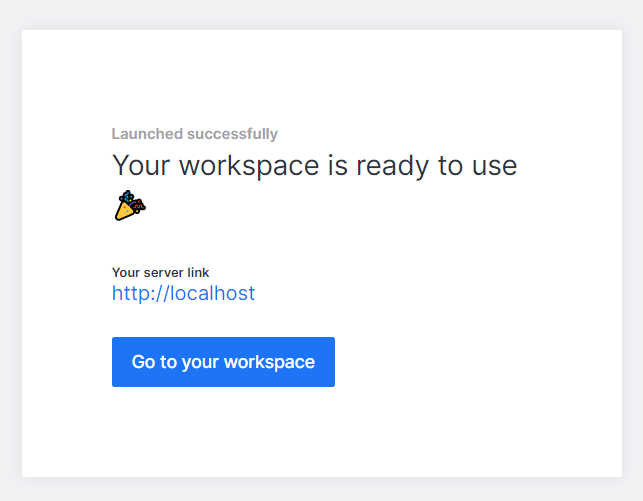
rocket.chat-final-step

Installing Let’s Encrypt SSL Certificate

Connect to remote server once again and execute the following command to install certbot first.

sudo snap set rocketchat-server caddy-url=https://<your-domain-name>
sudo snap set rocketchat-server caddy=enable
sudo snap set rocketchat-server https=enable
sudo snap run rocketchat-server.initcaddy

Now, it’s time to restart rocket.chat and caddy.

sudo systemctl restart snap.rocketchat-server.rocketchat-server.service
sudo systemctl restart snap.rocketchat-server.rocketchat-caddy.service

Conclusion

Building chat server for your company or organization not that difficult as it seems. With rocket.chat script you can easily build it. Also, you have multiple option to choose from, not only for OS but also container.

May 4, 2021/0 Comments/by Dhiraj Rahul
Tags: open source chat app, private chat server, rocket.chat
Share this entry
  • Share on Facebook
  • Share on X
  • Share on WhatsApp
  • Share on Pinterest
  • Share on LinkedIn
  • Share on Tumblr
  • Share on Vk
  • Share on Reddit
  • Share by Mail
https://inguide.in/wp-content/uploads/2021/05/rocketchat.jpg 720 1280 Dhiraj Rahul https://inguide.in/wp-content/uploads/2021/02/inguide_logo_red_340_156-300x138.png Dhiraj Rahul2021-05-04 10:25:402021-05-06 06:06:54Build Self Hosted Private Chat Server with Open Source rocket.chat
0 replies

Leave a Reply

Want to join the discussion?
Feel free to contribute!

Leave a Reply Cancel reply

Your email address will not be published. Required fields are marked *

Table of Contents

Search Search

Recent Posts

  • Install Mattermost on Ubuntu/Debian
  • 17 Popular Free & Paid Mail Transfer Agents
  • Top 10 VPN Service Providers & Why!!
  • 15 Best Canva Alternatives for Graphic Design [Free & Paid]
  • 12 Best third-party SEO tools for your website
  • Best NFT Marketplace For Beginners
  • Best WordPress ad management plugin
  • What is Domain Name System blacklist (DNSBL)?
  • Introduction to the Basics of Linux
  • What is Proxy Server?

Categories

  • Chat & Collaboration
  • Domain
  • Email Marketing
  • Email Service
  • Graphic Design
  • Hosting
  • Learning Management System
  • Linux
  • Miscellaneous
  • Proxy
  • Search Engine Optimization
  • SMS
  • SMTP server
  • WooCommerce
  • Wordpress
  • WP Security
Popular
  • Postal-smtp-server
    Build Postal SMTP Server & Send Bulk Emails Step by...March 25, 2021 - 5:19 am
  • install-configure-powermta-centos-8
    Install & Configure PowerMTA on CentOS with IP rot...February 15, 2021 - 4:23 am
  • postal-create-SMTP-add-domain-SSL
    Simplest Way to Configure Postal & Create SMTP + Install...March 27, 2021 - 9:20 am
  • Install CyberPanel on Ubuntu and Create WordPress Websi...September 22, 2021 - 10:05 am
  • Create Mail Server on Windows with Open Source hMailSer...June 13, 2021 - 10:15 am
  • zimbra-free-ssl-certificate-install
    How to Install Free SSL Certificate on Zimbra Mail Serv...May 9, 2021 - 2:21 pm
  • install-zimbra-mail-server-on-centos-8
    Install Zimbra Mail Server on CentOS 7/8 Step by StepMay 9, 2021 - 6:05 am
  • Install and Configure MailCow – Best Self Hosted Mail...May 12, 2021 - 10:32 am
  • lets-encypt-certificate
    Installing Let’s Encrypt Free SSL Certificate on ...March 24, 2021 - 7:36 am
  • install-wordpress-cloud-hosting
    Super Easy Way to Install WordPress on Cloud Hosting in...March 30, 2021 - 1:35 am
Comments
  • vikasCannot "Build a new mail server" #3295 On a fresh installation...May 15, 2025 - 1:19 pm by vikas
  • SivaHow can find about aol blocking and know about email inbox...February 26, 2025 - 7:04 pm by Siva
  • RAKESH GUPTAWe want to change our default CentOS Mail Server to something...December 5, 2024 - 7:15 am by RAKESH GUPTA
  • LavisHey, Can you help me to choose good SMTP server between...November 18, 2024 - 11:12 am by Lavis
  • ApostleThis question is never answeredOctober 29, 2024 - 6:19 am by Apostle
Tags
Ahrefs Aol Canva dkim dkim generator dkim powermta dmarc generator easyengine email deliverability free Gmail install docker ubuntu install free ssl zimbra install mailcow install mailwizz install wordpress install wordpress on google install zimbra centos 8 iredmail mailcow Mailu mailu docker compose mailwizz Memberpress MTA open source chat app outlook Plugin Postal postal server postal smtp private chat server rocket.chat SEO smtp server spf generator Talos VPN WooCommerce WordPress wordpress on cloud hosting Yahoo zimbra zimbra mail server zimbra ssl

Follow us on Facebook

X Logo X Logo Followon X

Information

  • About
  • Account
  • Blog
  • Contact
  • Deals
  • List of VPS Hosting that Provides Open Port 25
  • Login
  • Newsletter
  • Privacy Policy
  • Terms of Service
  • Thank You
  • Verify Account

Resources

  • Account
  • Deals
  • Downloads
  • List of VPS Hosting that Provides Open Port 25
  • Login
  • Services
  • Thank You
  • Verify Account

Categories

  • Chat & Collaboration
  • Domain
  • Email Marketing
  • Email Service
  • Graphic Design
  • Hosting
  • Learning Management System
  • Linux
  • Miscellaneous
  • Proxy
  • Search Engine Optimization
  • SMS
  • SMTP server
  • WooCommerce
  • Wordpress
  • WP Security

Archive

  • November 2025
  • July 2023
  • June 2023
  • May 2023
  • January 2023
  • November 2022
  • September 2022
  • August 2022
  • July 2022
  • June 2022
  • May 2022
  • September 2021
  • June 2021
  • May 2021
  • April 2021
  • March 2021
  • February 2021
© Copyright - inGuide | Digital Marketing, Online Business & WordPress
  • Terms of Service
  • Privacy Policy
Link to: Ultimate Guide to Install & Configure Mailwizz on Cloud Link to: Ultimate Guide to Install & Configure Mailwizz on Cloud Ultimate Guide to Install & Configure Mailwizz on Cloudultimate-guide-install-configure-mailwizz Link to: What are DKIM, DMARC and SPF? How they affect email delivery? Link to: What are DKIM, DMARC and SPF? How they affect email delivery? what-is-dkim-dmarc-spf-rdnsWhat are DKIM, DMARC and SPF? How they affect email delivery?
Scroll to top Scroll to top Scroll to top