
Why Emails are going to Spam from my Domain?
Email marketing is a lucrative business and growing rapidly. It’s is not only effective but the cost per lead is very small compared to other ways of digital marketing. Also, in today’s world when everyone is digitally connected, what would be the best way to promote a product?
But there are several mistakes newcomers do at the beginning and the email goes straight to spam from your domain. In this article, we will see how ISP catches spammer, how it concludes a particular email is spam. So, that you would be able to avoid that.
What is Spam?
According to Spamhaus the definition of spam is as follows:
The word “Spam” as applied to Email means “Unsolicited Bulk Email”.
Spamhaus
Here, Unsolicited means that the email recipient has not given his or her consent to receive emails from such entities. And bulk means similar email is being delivered to large number of people.
Therefore, you can see even it’s just promotional email sent to somebody, but without consent, it’s spam.
Why emails goes to spam from your domain?
There are number of reason for that. However, I have listed few important ones here.
1. Buying new domain for Email Marketing
This is the biggest mistake email marketer do. They buy one domain exclusive for email marketing. However, they have product listed on other domain.
A domain should be at least 1 month old before you start emailing from that domain.
2. Buying .top, .xyz, .site, .online cheap TLDs for Email Marketing
This is another blunder email marketer usually do. They buy cheap TLDs like .top, .xyz, .site, .online, .club, etc. for emailing. Now a days, these fancy TLDs are by default labelled as abusing TLDs. Therefore whatever you do email will not see light to inbox.
You must buy popular TLDs like .com, .net, .org or any ccTLDs (country level TLD) like .us, .in, .co, .uk, .ca, .it, etc.
3. Not paying attention to IP address when buying
When you buy a VPS, cloud or dedicated server you must look for the IP address. Sometimes those IP are blacklisted due to abuse by past owner. Now, when you send emails from those blacklisted IP, your domain will also get blacklisted. And above that, you will get spammer tag.
4. Not configuring all security protocols properly
There are four-five security protocols for emails. These protocols are DKIM, DMARC, SPF, reverse DNS. It enables ISP to establish the true identity of the email sender. If ISP fails to establish true identity then they send received emails into junk. Therefore, you must take care of those records.
5. No MX record for the domain
No MX record means no return path. There’s no way the customer or ISP can communicate with you for further queries. You might not be able to capture bounce emails unless you have some other mechanism in place. Therefore, the MX record is indispensable.
6. Buying domain name with spammy keyword
Buying domain name with keywords like free, billing, support, account, etc. falls in the suspicious list of ISP. Though they didn’t outright ban, these words are always on the priority watchlist. Therefore, as soon as they get any abuse report from those domains, they blacklist them.
7. Skipping IP warming
Skipping IP warming has the most disastrous consequence. Even though your server would be capable to send unlimited but ISP will refuse to accept. You will see errors like soft fail with various codes 470, 554, etc. Therefore, you must not skip the IP warming.
8. Sending bulk emails from very first day
This is perhaps the most common mistake. First of all, they skip the IP warm-up and then send bulk emails from the very first day. That’s how spammer gets caught. Since spammer work on use and throw mode, they quickly build the SMTP server and send bulk emails. This is pretty much known to every ISP.
9. Not verifying email list
When you send emails without verifying the email list, most of them are bound to bounce back. ISP takes this matter seriously. Also, as email list grows older, they become more & more redundant. Also, many old emails were converted to spam-trap. If your emails are going to spam trap (honey trap) this means the chances of your server getting blacklisted is very high.
10. Invisible or no unsubscription link in email
One common behavior of spammers is that they use desktop-based email marketing applications. Therefore, they were unable to include the unsubscription link in the email. When customers couldn’t find unsubscribe link, they simply mark the email as spam.
Apart from that many email marketer skip adding unsubscribe link to newsletter. This makes then vulnerable to ISP wrath.
11. No user interaction
If you send irrelevant emails, for example promoting medical books to engineering students then no one will even bother to open email. And, if that happens only then there’s no issue. But this ain’t happen only. Customer who receives such email would mark your email as spam and that’s how you earn spammer tag.
12. Recipients marking email as spam
I already discussed one cause for email getting marked spam. Other causes are sending emails to a bought email lists, sending too many promotional emails, failing to take consent, etc. Though ISP tolerates complaints up to a certain extent and it considers very human nature to falsely flag even good emails. But after a certain limit, ISP start directing your email to spam
13. Using same email template over and over
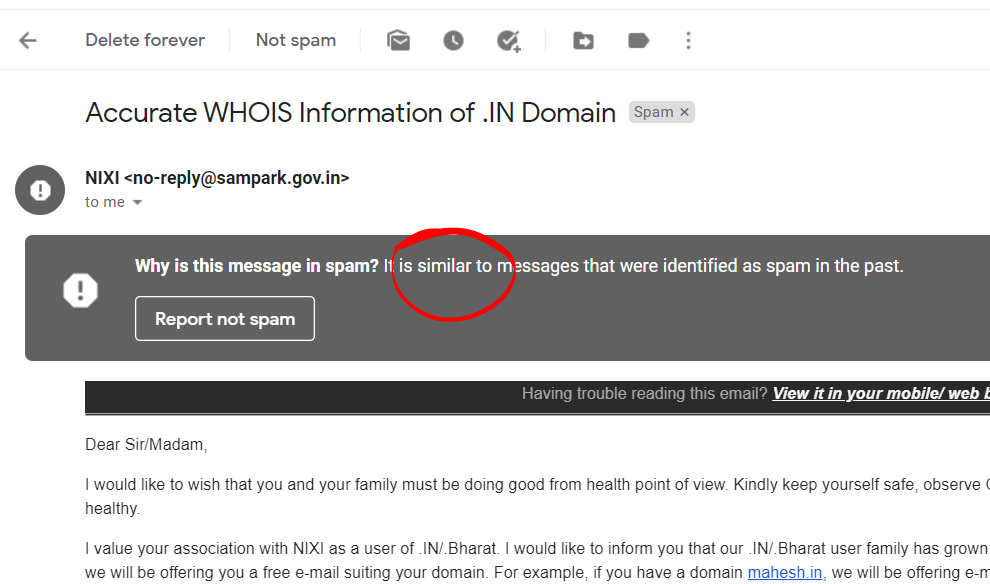
You might have come across the following message when you open a spam email. It clearly says a similar email has been identified in past and therefore it’s been marked as spam. Though you can see, an email has been sent to me from .gov.in domain. Therefore, you must update your email template from time to time.
Conclusion
There are many reasons for emails to go to spam. Therefore, if email goes to spam no big deal in that. What is important is the steps you are going to take after that.
Leave a Reply
Want to join the discussion?Feel free to contribute!