
inGuide | Digital Marketing, Online Business & WordPress
  • Home
  • Blog
  • Deals
  • Services
  • Forum
    • New Forum
  • Free Resources
    • inSend: Mailwizz
  • Contact
  • Click to open the search input field Click to open the search input field Search
  • Menu Menu
Email Service, SMTP server

Why email goes to spam in Gmail, AOL, & others?

Brief explanation of email spam
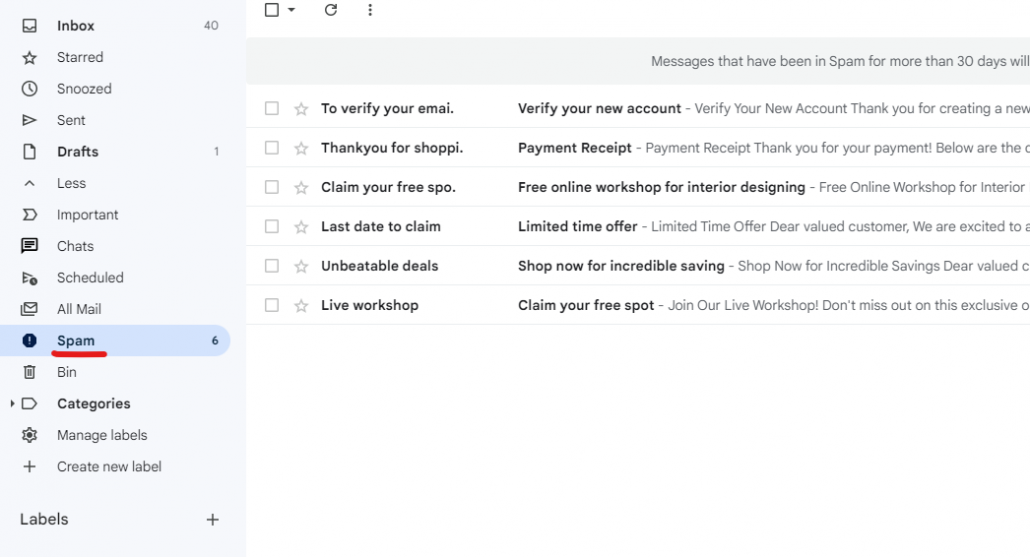
email spam

Email spam refers to unsolicited and unwanted emails that are sent in bulk to a large number of recipients. These emails are typically sent for commercial or malicious purposes, often containing promotional content, scams, phishing attempts, or malware. Email spam can be a significant nuisance and poses various risks to users, including privacy breaches, identity theft, and financial fraud.

Spammers obtain email addresses through various means, such as purchasing email lists, scraping websites, or using software to generate random email addresses. They use automated tools to send out a massive volume of emails, targeting a wide range of recipients indiscriminately.

Importance of understanding spam filters

Understanding spam filters is crucial in today’s digital landscape where email communication plays a significant role. Here are some key reasons why understanding spam filters is important:

1. Email Deliverability

2. Protecting Sender Reputation

3. Avoiding False Positives

4. Compliance with Anti-Spam Regulations

5. Enhancing User Experience

The 10 Most Common Reasons Why Emails Go to Spam

1. You Weren’t Given Permission

2. You Haven’t Set Up Email Authentication

3. You Don’t Include an Unsubscribe Link

4. Making Use of Spam Trigger Words

5. You Have a Weak Subject

6. You’re Not Following HTML Best Practices

7. A big image with little text

8. Your Recipients Marked Your Emails as Spam

9. Sending Emails to inactive Accounts

10. Poor grammar and spelling

Email Filtering Algorithms of Popular Providers:

1. Gmail:

Content-based Filtering: Gmail’s algorithm scans incoming emails for spam indicators, including suspicious URLs, excessive promotional language, and known spam keywords.

Sender Reputation: Gmail evaluates the reputation of the sending IP address and domain to determine the likelihood of an email being spam.

User Feedback: Gmail considers user actions like marking emails as spam, moving them to the spam folder, or marking them as important to train its filtering system.

Machine Learning: Gmail utilizes machine learning algorithms that continuously learn from user actions and feedback to improve its filtering accuracy.

2. Outlook:

Content Analysis: Outlook’s algorithm scans emails for spam characteristics like suspicious links, capital letters, and poorly formatted HTML.

Sender Reputation: Outlook assesses the reputation of the sender’s IP address and domain based on their email sending history and authentication practices.

User Feedback: User actions like marking emails as junk or moving them to the junk folder contribute to Outlook’s filtering decisions.

Bayesian Filtering: Outlook employs statistical analysis techniques, including Bayesian filtering, to analyze email patterns and make filtering decisions based on probabilities.

3. Yahoo:

SpamAssassin: Yahoo utilizes the SpamAssassin filtering system, which evaluates emails based on a set of predefined rules and criteria, such as spam keywords, header analysis, and content analysis.

Domain Reputation: Yahoo checks the reputation of the sending domain and IP address to determine the credibility of the email source.

User Feedback: Yahoo considers user actions like marking emails as spam or moving them to the spam folder to improve its filtering accuracy.

DKIM and SPF Authentication: Yahoo verifies the authenticity of emails through DKIM and SPF authentication protocols.

4. AOL:

Spam Score: AOL assigns a spam score to each incoming email based on various factors such as the sender’s reputation, content analysis, and spam patterns.

User Feedback: AOL considers user actions like marking emails as spam or moving them to the spam folder to train its filtering system.

Content Analysis: AOL’s algorithm scans emails for spam indicators, including suspicious URLs, spam keywords, and promotional language.

Sender Authentication: AOL validates email senders through DKIM and SPF authentication methods to ensure the legitimacy of incoming emails.

These are just some of the factors and techniques employed by popular email providers to filter and categorize incoming emails. Understanding these algorithms optimizes email campaigns, improving deliverability and minimizing spam labeling

Conclusion

In conclusion, several factors contribute to why some emails end up in the spam folder rather than reaching the recipient’s inbox. The content and structure of the email, sender reputation and engagement, spam complaints and user feedback, email authentication, and IP reputation all play a crucial role in email deliverability.

Understanding these factors and taking proactive measures to optimize your email campaigns can significantly improve your chances of bypassing spam filters and reaching your intended audience effectively. By adhering to best practices, focusing on engagement, and maintaining a positive sender reputation, you can increase the chances of your emails successfully making their way to the inbox.

June 9, 2023/0 Comments/by Rakhi
Tags: Aol, email spam, Gmail, outlook, Yahoo
Share this entry
  • Share on Facebook
  • Share on X
  • Share on WhatsApp
  • Share on Pinterest
  • Share on LinkedIn
  • Share on Tumblr
  • Share on Vk
  • Share on Reddit
  • Share by Mail
https://inguide.in/wp-content/uploads/2021/02/inguide_logo_red_340_156-300x138.png 0 0 Rakhi https://inguide.in/wp-content/uploads/2021/02/inguide_logo_red_340_156-300x138.png Rakhi2023-06-09 01:31:542023-06-22 09:53:32Why email goes to spam in Gmail, AOL, & others?
You might also like
How to solve AOL mail Deliverability issues?
Understanding Private Blacklisting & Delisting for Gmail, AOL, & More
Zimbra Outlook Settings or Configuration Explained
How to solve Email Deliverability issues with Yahoo?
How to solve Microsoft deliverability issues?
How to solve Email Deliverability issues with Gmail?
0 replies

Leave a Reply

Want to join the discussion?
Feel free to contribute!

Leave a Reply Cancel reply

Your email address will not be published. Required fields are marked *

Table of Contents

Search Search

Recent Posts

  • Install Mattermost on Ubuntu/Debian
  • 17 Popular Free & Paid Mail Transfer Agents
  • Top 10 VPN Service Providers & Why!!
  • 15 Best Canva Alternatives for Graphic Design [Free & Paid]
  • 12 Best third-party SEO tools for your website
  • Best NFT Marketplace For Beginners
  • Best WordPress ad management plugin
  • What is Domain Name System blacklist (DNSBL)?
  • Introduction to the Basics of Linux
  • What is Proxy Server?

Categories

  • Chat & Collaboration
  • Domain
  • Email Marketing
  • Email Service
  • Graphic Design
  • Hosting
  • Learning Management System
  • Linux
  • Miscellaneous
  • Proxy
  • Search Engine Optimization
  • SMS
  • SMTP server
  • WooCommerce
  • Wordpress
  • WP Security
Popular
  • Postal-smtp-server
    Build Postal SMTP Server & Send Bulk Emails Step by...March 25, 2021 - 5:19 am
  • install-configure-powermta-centos-8
    Install & Configure PowerMTA on CentOS with IP rot...February 15, 2021 - 4:23 am
  • postal-create-SMTP-add-domain-SSL
    Simplest Way to Configure Postal & Create SMTP + Install...March 27, 2021 - 9:20 am
  • Install CyberPanel on Ubuntu and Create WordPress Websi...September 22, 2021 - 10:05 am
  • Create Mail Server on Windows with Open Source hMailSer...June 13, 2021 - 10:15 am
  • zimbra-free-ssl-certificate-install
    How to Install Free SSL Certificate on Zimbra Mail Serv...May 9, 2021 - 2:21 pm
  • install-zimbra-mail-server-on-centos-8
    Install Zimbra Mail Server on CentOS 7/8 Step by StepMay 9, 2021 - 6:05 am
  • Install and Configure MailCow – Best Self Hosted Mail...May 12, 2021 - 10:32 am
  • lets-encypt-certificate
    Installing Let’s Encrypt Free SSL Certificate on ...March 24, 2021 - 7:36 am
  • install-wordpress-cloud-hosting
    Super Easy Way to Install WordPress on Cloud Hosting in...March 30, 2021 - 1:35 am
Comments
  • vikasCannot "Build a new mail server" #3295 On a fresh installation...May 15, 2025 - 1:19 pm by vikas
  • SivaHow can find about aol blocking and know about email inbox...February 26, 2025 - 7:04 pm by Siva
  • RAKESH GUPTAWe want to change our default CentOS Mail Server to something...December 5, 2024 - 7:15 am by RAKESH GUPTA
  • LavisHey, Can you help me to choose good SMTP server between...November 18, 2024 - 11:12 am by Lavis
  • ApostleThis question is never answeredOctober 29, 2024 - 6:19 am by Apostle
Tags
Ahrefs Aol Canva dkim dkim generator dkim powermta dmarc generator easyengine email deliverability free Gmail install docker ubuntu install free ssl zimbra install mailcow install mailwizz install wordpress install wordpress on google install zimbra centos 8 iredmail mailcow Mailu mailu docker compose mailwizz Memberpress MTA open source chat app outlook Plugin Postal postal server postal smtp private chat server rocket.chat SEO smtp server spf generator Talos VPN WooCommerce WordPress wordpress on cloud hosting Yahoo zimbra zimbra mail server zimbra ssl

Follow us on Facebook

X Logo X Logo Followon X

Information

  • About
  • Account
  • Blog
  • Contact
  • Deals
  • List of VPS Hosting that Provides Open Port 25
  • Login
  • Newsletter
  • Privacy Policy
  • Terms of Service
  • Thank You
  • Verify Account

Resources

  • Account
  • Deals
  • Downloads
  • List of VPS Hosting that Provides Open Port 25
  • Login
  • Services
  • Thank You
  • Verify Account

Categories

  • Chat & Collaboration
  • Domain
  • Email Marketing
  • Email Service
  • Graphic Design
  • Hosting
  • Learning Management System
  • Linux
  • Miscellaneous
  • Proxy
  • Search Engine Optimization
  • SMS
  • SMTP server
  • WooCommerce
  • Wordpress
  • WP Security

Archive

  • November 2025
  • July 2023
  • June 2023
  • May 2023
  • January 2023
  • November 2022
  • September 2022
  • August 2022
  • July 2022
  • June 2022
  • May 2022
  • September 2021
  • June 2021
  • May 2021
  • April 2021
  • March 2021
  • February 2021
© Copyright - inGuide | Digital Marketing, Online Business & WordPress
  • Terms of Service
  • Privacy Policy
Link to: How many email PowerMTA can send to Gmail, Outlook & more? Link to: How many email PowerMTA can send to Gmail, Outlook & more? How many email PowerMTA can send to Gmail, Outlook & more? Link to: How to solve Email Deliverability issues with Gmail? Link to: How to solve Email Deliverability issues with Gmail? How to solve Email Deliverability issues with Gmail?
Scroll to top Scroll to top Scroll to top